
Finished your parkrun and immediately headed online to find your result? You may have spotted that there’s rather more information than just your finishing time to check out.
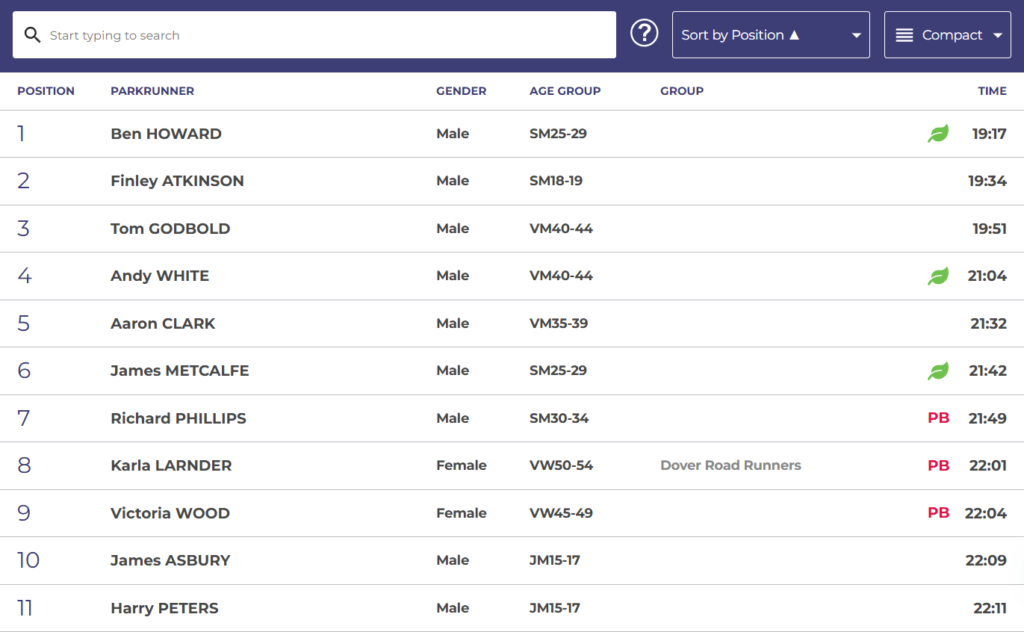
Your parkrun result shows your finish time, overall position, age category, age grading, and whether you’ve achieved a personal best (PB). It can look a bit confusing at first, especially if you’re new to parkrun, but most of the information is fairly straightforward once you know what each column means.
So, how do parkrun results actually work? And what do all of those numbers on the results page really mean? Let’s break it down.
How Do Parkrun Results Work?
Once you’ve completed a parkrun and had your barcode scanned, your result is added to the event’s results. Your finishing time and position are recorded, and the result is linked to your parkrun profile using your athlete barcode.
After the event, volunteers process and upload the results, which you’re then able to find on your parkrun app or on the parkrun website. Your results include more than just how quickly you completed the 5k. You’ll also see your age category, age grading, and whether you achieved a personal best (PB).
For example, a result page might look something like this:
| Result | Example |
| Position | 62nd |
| Time | 24:46 |
| Age category | VW30-34 |
| Age grade | 56.21% |
| PB | No |
So, what does all of this actually mean? Position tells you where you finished compared with the other participants, while your time is how long you took to finish the event. Your age category groups your result with other runners in the same age bracket, and age grading gives an indication of how strong your performance was relative to age-based benchmarks.
Finally, the PB column tells you whether you’ve recorded your fastest time both at that event and your overall parkrun record.
Check Out Our Guide To All The Parkrun Rules
What Does Your Parkrun Result Mean?
Once your parkrun result is up, you’ll see several bits of information against your name. Most are pretty self-explanatory, while others – looking at you, age grading – can take a little bit more explaining.
The three things you’re likely to pay attention to are your finishing position, time and age category. Here’s what each of these means.
Finishing Position
Your finishing position tells you where you finished compared with the other participants at that particular parkrun event. If your result says 72nd, for example, it means you were the 72nd person to cross the finish line.
It’s important to keep in mind that your position isn’t the same thing as your time. Your time tells how quickly you finished the course, while your position tells you how you performed relative to everyone else running that day.
This means your position can vary dramatically from week to week, even if you run almost precisely the same time. A 25-minute run at a bustling, busy parkrun with hundreds of runners could leave you much further down the results than a 25-minute run at a far smaller event.
Your finishing position is good to track, but it isn’t necessarily the best measurement of your own progress. If you’re getting faster but happen to run at an especially busy event, your position may not reflect that improvement.
Your Parkrun Time
Your parkrun time is the official time recorded for you to finish the course. This is the time you’ll see alongside your name in the results and the time used when determining whether you’ve achieved a PB at that event.
You may notice that your official parkrun time may not necessarily match the time on your Garmin or Apple Watch – don’t worry, that’s totally normal.
Your watch starts and stops according to when you press the buttons (or its own automatic settings), while parkrun uses its own timing and results system. GPS watches can also measure a slightly different distance from the official 5k course, especially if the course has lots of turns or you’re running around other people.
For example, your watch may say you’ve run 5.07km in 23:47, while your official parkrun result says 23:53. The two figures aren’t necessarily contradictory; they’re just measuring your run in slightly different ways.
When it comes to your official parkrun record and PB, the time shown in your parkrun result is the one that matters.
Age Category
Your age category groups your result with other parkrun participants in the same age bracket. You’ll see a category such as JM10, JW20, VM40-44 or SW25-29 alongside your result.
The letters and numbers may not make much sense initially, but there’s a simple system behind them. Categories include:
- JM10 / JW10 – Boys and girls aged 10 and under
- JM11-14 / JW11-14 – Boys and girls aged 11-14
- SM18-19 / SW18-19 – Men and women aged 18-19
- 20-24, 25-29, 30-34, and so on for adult age groups
The J categories are junior categories, while S indicates the standard adult categories. The M/W distinction identifies the category used for men or women, followed by the relevant age range.
Your age category is handy because it allows you to see how your result stacks up against other runners in a similar age group. It also forms part of the calculation used for your age grade, which is another number you’ll find on your parkrun result.
What Is Parkrun Age Grading?
One of the more confusing numbers on your parkrun result is your age grade. You’ll see it displayed as a percentage, but what does that percentage actually tell you?
Your parkrun age grade is a percentage designed to show how your performance compares with a benchmark for your age and gender. In simpler terms, it helps put your finishing time into context.
For example, a 25-minute 5k is a totally different achievement for a 20-year-old runner compared to a 60-year-old runner. Age grading helps to account for those differences, allowing runners of different ages to get a better handle on how strong their performance was relative to an age-based standard.
It’s important to keep in mind that age grade isn’t the same as your finishing position. Your position tells you where you finished, whereas your age grade is about how your performance compares with a benchmark.
Generally, the higher age grade, the stronger your performance is considered to be relative to that benchmark. This can make age grading especially handy for tracking your progress over time. Even as you get older, you can use your age grade to measure whether your performances are continuing to improve relative to your age range.
So, rather than asking “How fast did I run?” age grading helps give you another thought: “How good was that performance for someone my age?”
What Is a Good Parkrun Age Grade?
There isn’t a single age grade that officially qualifies as “good” on parkrun. It’s better to think of the percentages as rough guidelines rather than official rankings or targets.
But, as a general rule of thumb:
- 50% – a useful benchmark for many recreational runners
- 60%+ – a strong recreational performance
- 70%+ – a very strong performance
- 80%+ – an exceptional performance
These figures shouldn’t be viewed as strict pass or fail marks. Your age grade is mainly a tool for comparing performances and tracking your own progress, rather than a competition in itself.
And that’s arguably where age grading is most useful. If your age grade increases from 52% to 56%, for example, you’ve got another indication that your running performance has improved – even if your overall finishing position hasn’t changed.
Check Out Our Guide On What A Good Parkrun Time Is
What Does A PB Mean On Parkrun?
If you’ve seen “PB” next to your name on the parkrun results, congrats to you – you’ve run a Personal Best!
A PB (Personal Best) is your fastest recorded time either at that event or overall in your parkrun journey. So, if the first time you recorded at parkrun was a 26:20, and then you get a 26:10 the following week, your result will be marked as a PB.
Parkrun has two types of PB on the results page: Event PB and Overall PB. Your Event PB is the quickest time you’ve set at each individual parkrun event, while your Overall PB is the fastest time you’ve ever set across all parkrun locations you’ve run.
Does Parkrun Give You a PB Automatically?
Yes. You don’t need to tell anyone that you’ve beaten your previous best.
When your results are processed, the parkrun results system compares your new time with your previous recorded results at that event. If you’ve run faster than your previous best, the result is identified as a PB.
It’s one of the nicest little moments of parkrun: finish, scan your barcode, and then discover that you’ve quietly knocked a few seconds off your previous best. You may even get a shout-out on that parkrun’s Facebook page later on!
When Do Parkrun Results Come Out?
If you’re like us, waiting for parkrun results to come out can be surprisingly nerve-shredding. The good news is that parkrun results are usually available relatively soon after the event ends, once the volunteer team has processed and uploaded them.
Results aren’t necessarily instant. There can be a small delay between finishing up at the event and checking online once you get back home. You’ll often be notified by email once the results have been published.
The timing can vary depending on the event. A busy parkrun, a particularly large field or an issue with the scanning can sometimes mean you need to wait a little longer than usual.
So, if you’ve finished parkrun, scanned your barcode and can’t immediately find your result, don’t panic. It doesn’t necessarily mean something has gone awry.
If your result still hasn’t appeared after a few hours, it’s worth checking that you’re looking at the correct event and that your barcode was scanned properly. If there’s a genuine issue with your result, you can get in touch with the event team for help, usually via email or on Facebook.
Check Out Our Guide To How The Parkrun Barcode Works
Why Isn’t My Parkrun Result Showing?
Finished your parkrun, scanned your barcode and then checked the results – only to discover that your name isn’t there? Don’t worry. A missing parkrun result doesn’t necessarily mean that something’s gone wrong.
There are a number of reasons why your result may not show up immediately.
Your Result Is Still Being Processed
The most common explanation is that the volunteer team hasn’t finished processing the results yet. Results aren’t always published immediately after the event, especially when there are a lot of runners.
Your Barcode Wasn’t Scanned
If your barcode wasn’t scanned successfully, the event team may not be able to link your finishing result to your parkrun profile. This can happen if your barcode won’t scan or if there’s another issue during the scanning process.
There Was a Problem With Your Finish Token
Parkrun uses finish tokens alongside its timing system to match runners with their finishing times. If a token is missing, damaged, or recorded incorrectly, it can sometimes cause a result to be matched incorrectly, or not show up as expected.
You Gave the Wrong Barcode or Details
Entering or providing incorrect details can also cause problems when the results are processed. It’s worth double-checking that you’re using the correct parkrun barcode.
What Should I Do If My Parkrun Result Is Missing?
First, give your event team a little time to process the results. If your result still hasn’t shown up, contact the team at the parkrun you attended and explain what happened. They may be able to investigate the results and correct a genuine error.
Can You Change A Parkrun Result?
Made a mistake with your barcode or spotted something wrong with your result? Parkrun results can sometimes be corrected if there has been a genuine error. However, results typically aren’t changed just because you’re unhappy with your finishing time or position.
For example, you might need to get in touch with your event organiser if you’ve:
- Been given the wrong finishing position
- Had your result linked to the wrong barcode
- Completed the event but have a missing result
- Noticed that your athlete information is incorrect
If you think there’s been an error, the best thing to do is reach out to the volunteer team at the parkrun you attended and explain what’s happened. They can check the event’s results and make the correction where appropriate.
It’s worth keeping in mind that your official result reflects the information recorded by the event’s timekeeper and scanners. So while genuine errors can be fixed, you typically can’t ask for a result to be changed just because you think you deserved a few seconds off!
Do Parkrun Results Count As Official Race Times?
A parkrun is a timed 5k event, but it isn’t the same thing as an officially organised road race. That’s an important distinction if you’re looking to use your parkrun time as an entry or qualifying time for another event.
Your parkrun result is an official record of the time you ran at parkrun, and it’s perfectly valid to describe it as your parkrun PB or fastest 5k time. However, whether another race accepts that time for entry, seeding or qualifying purposes is totally down to the event’s organiser.
So, if you’re planning on using your parkrun time to enter another race, check out that event’s specific requirements rather than assuming your parkrun results will automatically qualify you.
For most runners, though, this distinction doesn’t really matter all that much. Your parkrun result is still a handy and consistent way of tracking your 5k performance and track how your running has progressed over time.
Can You See Your Previous Parkrun Results?
Yes. One of the best things about parkrun is that your results aren’t limited to the event you ran that morning. Once you’ve signed up and results are linked to your parkrun profile, you can look back through your previous performances.
Your results history can show things such as your finishing time, position, age category, age grade and PBs, giving you an easy way to track how your running has changed over time. You can also see how many parkruns you’ve completed, and how many locations you’ve visited.
This is especially useful if you’ve started parkrun tourism and enjoy visiting different events. Whether you’ve run your local course every Saturday or travelled across the country to try somewhere new, your results build up into a record of your parkrun journey.
It’s also a great way of looking back at old performances. My first effort was a 32:18, which I wasn’t too over the moon with, but now it’s a great way of seeing just how far things have come!
Wrap Up
At first glance, a parkrun results page can look like a lot of numbers. But once you know what you’re looking at, it really boils down to a few key things: how fast you ran, where you finished, how your performance compares with your age group, and whether you set a new PB.
And perhaps the most important thing to keep in mind is that your finishing position isn’t the complete story. Whether you finish first or 801st, you’ve still completed the same 5k challenge – and you’ve got another result to add to your parkrun journey.
So next time you check your results, don’t just look at your time. Have a look at your age grade, position, and previous performances too. You may be surprised by what you find.

Loves Parkrun. Hates running uphill. After investing in his first pair of proper running shoes, James was inspired to found What We Running in 2026 with the aim of sharing his favourite tips, tricks, and motivational hacks needed to sustain a running journey.